A little help with PayPal
Occasionally,
folks experience problems when they try to make a donation to DylanRadio.com
with PayPal. Lots of things can cause problems: A faulty proxy server, a faulty browser, or
just entering information that's
not exactly what PayPal wanted. In
any case, it's frustrating
for you and me both!
So, I put
together this little guide to help you with the data-entry part of donating, at
least.
The
following instructions assume that you don't already have a PayPal account, and
donating using a
credit card (Visa, Mastercard or Amex). If you DO already have a
PayPal
account, but are
unable to make a donation, you can still log out of PayPal and use these
instructions.
If you
follow these instructions and it STILL doesn't work, please cut and paste the
exact error message you're
getting and email it to pete@dylanradio.com
so I have
some evidence when I complain
to PayPal. (Or if you know how to do screen
captures,
that's even better). Anyway,
here we go...
To begin: [CLICK HERE TO OPEN A PAYPAL DONATE WINDOW]
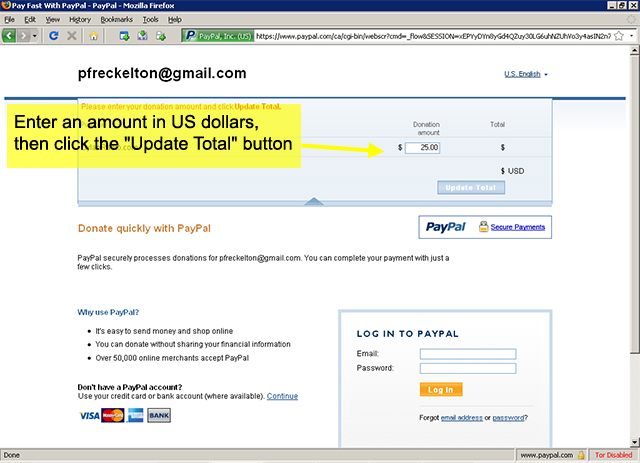
1. After clicking the Donate link above, you will
see the page displayed below.
Enter
an amount in US dollars, then click the "Update Total" button.
2.
After
updating your total, don't bother logging into PayPal. Just scroll down a bit
and
click the "Continue" link.

3.
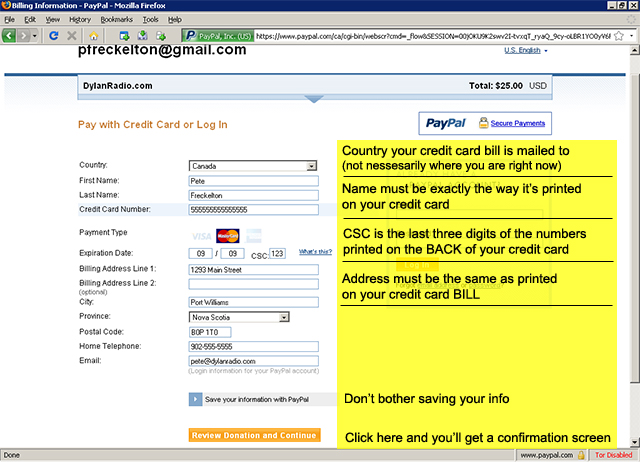
Now You need to fill in your credit
card info on the next page,
but
there are important rules:
- Country needs to be the one that your
credit card bill gets mailed to.
- Your first & last name should
be exactly as it is printed on your credit card
- Your "CSC number" must
be the last three digits of the number printed on the BACK of your
credit card
- Your address should be the same as
printed on your credit card BILL
4.
Click "Review Donation and
Continue" and you should be taken to a confirmation
Screen
to confirm your donation.
Hope that helps. If it still
doesn't work, please cut and paste the error you receive in an
email to pete@dylanradio.com so that
I have something to show PayPal when I give them
a piece of my mind (which I can't afford to lose).
Regardless, I appreciate the you support DylanRadio.com, with or without
a financial
donation. Remember to
keep a good head, and always carry a lightbulb.